01 / LOCAL
01 / LOCAL
Run on your hardware.
Point VARIANT-1 at a GGUF model and it runs llama.cpp for you, or connect LM Studio. No per-message fees.
Local modelsTHE PRODUCT / A LIVING WORKSPACE
VARIANT-1 gives your model a live Python session, tools for files, the web, and your desktop, and room to keep going. Ask for a result, watch it come together, and carry on in the same chat.
01 / THE WORKSPACE
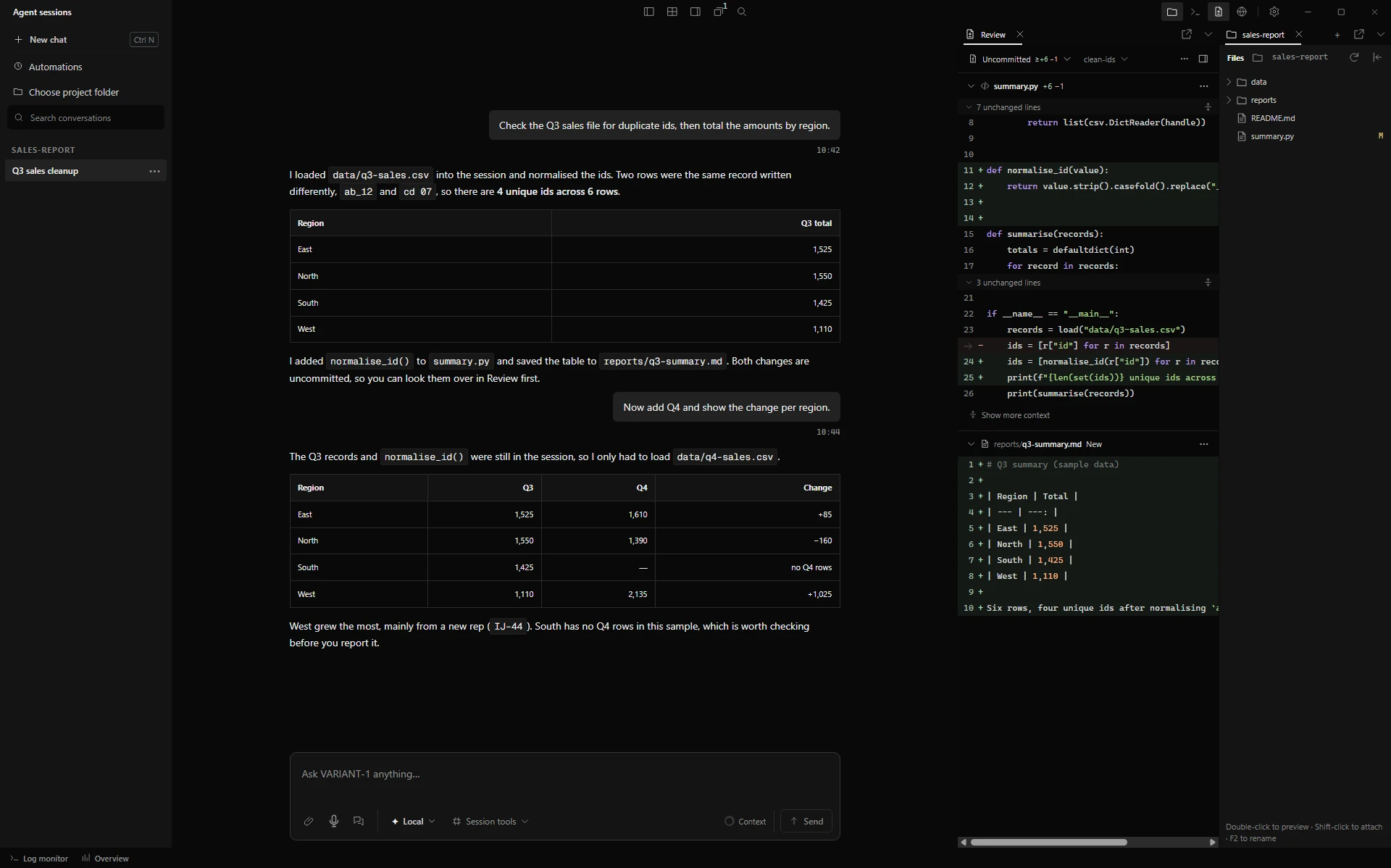
Bring a project, a folder of documents, or a job in another app. The model works through it with code and tools, while the chat, files, browser, terminal, and Review pane keep everything in view.
MAIN DECK / PREVIEW, OCTOBER 2026
02 / YOUR LAYOUT
Files, Review, the browser, and the other side panels can each leave the main window and become a window of their own. A chat, the Log monitor, and Overview can open in their own windows too, so the work can spread across one screen or several.
Keep an eye on Overview or the logs while you work in another app, then send everything back into place when you’re done.
SCREEN RECORDING / PREVIEW, OCTOBER 2026
03 / LIVING STATE
Clean a dataset, then ask for a different comparison. The model reuses the data and helpers from earlier steps for as long as the chat’s session runs. Overview → Python shows every live session and what it’s doing.
A restart clears live data. Checkpoints can keep supported values if you turn them on, and the chat’s own history stays searchable through session context.
See what lasts
The data and the helper are still in the session. The next step can use them straight away.

Checkpoints are off by default. After a restart, the agent can look back through the chat with session context, then rebuild only what’s missing.
04 / EVOLVING TOOLS
Your model turns repeated steps into Python helpers and combines them with other tools. The code stays readable, so you can see exactly how the work gets done.
Turn on mutation and it can go further: propose a better version of a tool, test it, and switch it on for the chat. Every change is recorded, and any change can be rolled back.
Read about tools and mutationMutation is off by default and never retrains the model. Turning it off stops new changes; changes already switched on stay until you roll them back.
05 / GOALS & AUTOMATIONS
Start a Goal and the agent keeps a bigger objective on track: a plan, progress notes, and anchors to pick up from. It can bring in helper agents for parts of the job, and you can see what each one is doing.
Automations run an instruction on a schedule or when something happens on your computer. With the optional messaging gateway, you can even check in from Telegram or Discord.
How goals and automations workGoals and automations call your model like any chat does, so keep an eye on usage, and pause anything you aren’t watching.
06 / OVERSIGHT
The Review pane shows file changes as readable cards with line numbers, lets you browse Git history across branches, and you can ask the agent to commit, push, or open a pull request.
Activity marks steps that failed, were stopped, or ended unclear, instead of calling everything a success. Overview shows live sessions, their CPU and memory, and the logs.
You can steer a task while it runs, queue your next message, or stop it. Stopping can’t undo what already happened, so the record matters.
How you stay in controlREVIEW+2 −1
reports/summary.py 1 file
BRANCH clean-ids → main3 COMMITS
Ask the agent to commit, push, or open a pull request.
ACTIVITYLAST RUN
OVERVIEW · PYTHON2 LIVE
07 / MODEL CHOICE
Run a model on your own machine, add an API key, or sign in with a plan you already have. Pick the model for each chat, and line up backups in Settings → Model routing.
01 / LOCAL
Point VARIANT-1 at a GGUF model and it runs llama.cpp for you, or connect LM Studio. No per-message fees.
Local models
02 / API
Add a key for OpenAI, Anthropic, Gemini, OpenRouter, and dozens more, or any OpenAI-compatible endpoint. Your provider bills you directly.
API connections
03 / ACCOUNT
Sign in with a ChatGPT subscription, or use a desktop service you are already signed in to, such as Ollama.
Account connections